Introduction
This is the vendor lock-in trap, and it’s becoming an increasing challenge in the AI era. Industry analysts project a 25.1% CAGR from 2023 to 2028, indicating sustained expansion beyond initial adoption, making vendor lock-in even more of a critical issue for enterprises.
What is Model Context Protocol (MCP)?
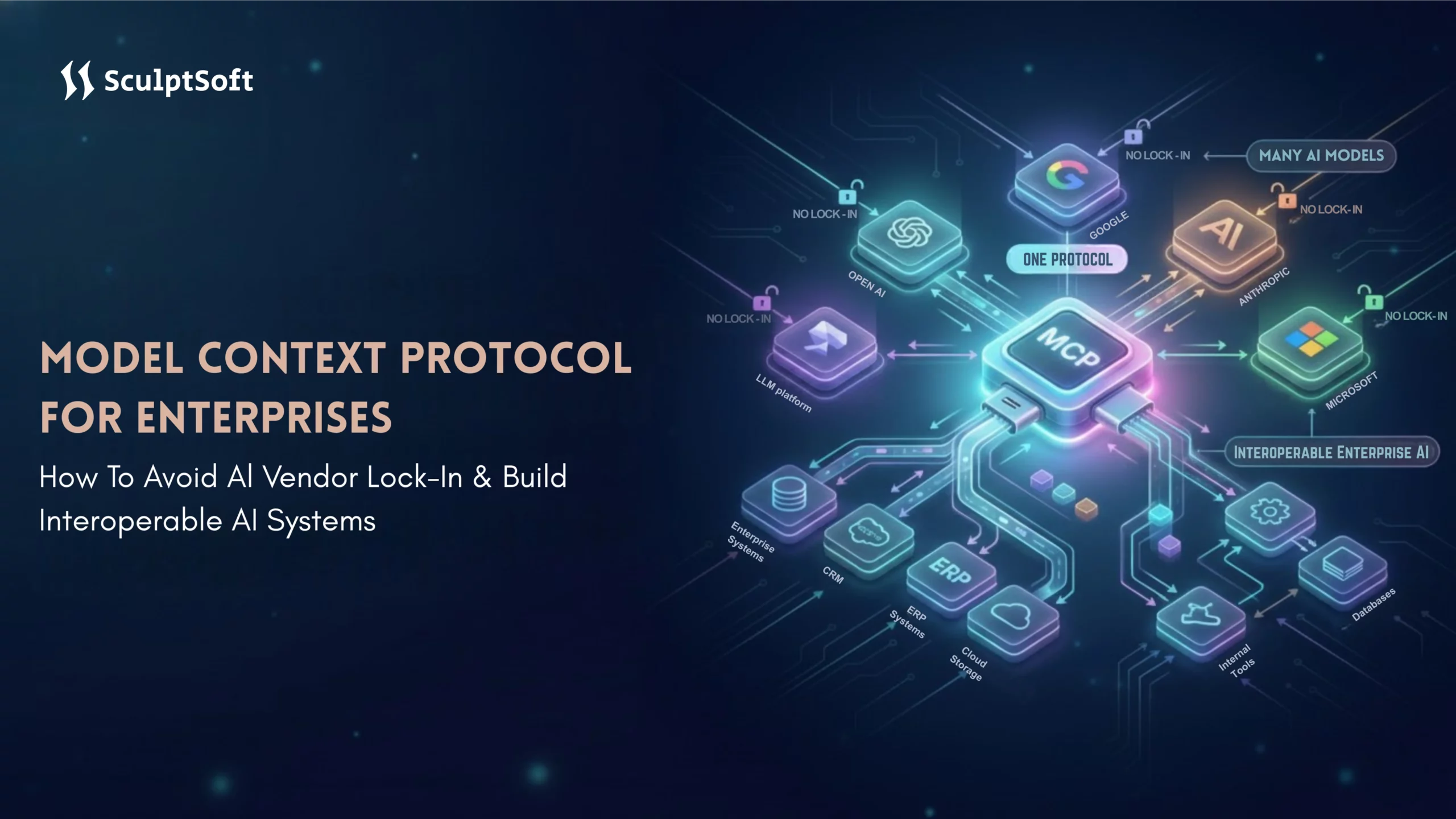
The Model Context Protocol (MCP) is a revolutionary open-source standard designed to solve the challenges of connecting AI models to diverse business systems, data sources, and tools. Think of MCP as the “USB-C for AI” – just as USB-C simplifies device connections by using a universal standard, MCP enables seamless AI integrations without custom code.
How MCP Works
Before MCP, connecting AI models (like ChatGPT, Claude, or others) to enterprise systems involved building custom integrations for each data source or tool, resulting in a maintenance headache. For example:
- Want to integrate an AI model with Salesforce? Custom code.
- Need to connect to Google Drive? Another custom integration.
- How about an internal database? Yet another custom solution.
MCP solves this by providing a universal interface that lets any compatible AI model easily connect to any data source or tool. You only need to build the connection once, and then any MCP-compatible AI model can leverage it, without the need for custom code for every new model.
The Architecture of MCP
MCP’s architecture is simple yet powerful. It uses a two-layer system:
-
- MCP Servers act as connectors between your data sources (databases, APIs, business tools) and AI models. These servers expose your systems through a standardized protocol, which translates proprietary systems into a common language understood by AI models.
- MCP Clients are embedded within AI applications (like Claude Desktop, ChatGPT, or custom AI Agents) and act as the requesters. When an AI model needs information from a business system (e.g., Salesforce CRM), the MCP client sends a request through the protocol, and the MCP server responds with the data in a standardized format.
Three Core Capabilities of MCP
- Tools: Functions AI models can invoke to perform actions, such as searching a database, sending emails, or analyzing documents.
- Resources: Data that AI models can access, like documents, database records, or file contents.
- Prompts: Pre-configured templates that guide how AI models interact with your systems, ensuring consistency and accuracy in their actions.
Key Benefits of Using MCP for Your Enterprise
MCP provides a flexible foundation for AI architecture, enabling enterprises to build scalable, interoperable AI solutions. Here’s how it benefits your business:
- Easily switch AI models without having to rewrite integrations.
- Leverage multiple AI models simultaneously for different tasks, increasing efficiency and flexibility.
- Connect once to proprietary systems and reuse the integration across all AI tools, saving time and effort.
- Avoid vendor lock-in by maintaining competitive flexibility and reducing dependency on a single vendor’s pricing and offerings.
- Future-proof your AI investments by integrating new AI models as they become available, without significant redevelopment.
The Hidden Cost of AI Vendor Lock-In: Why Enterprises Are Trapped
Let’s talk about what happens when you don’t have MCP, when you’re locked into a single AI vendor’s ecosystem.
What is AI Vendor Lock-In?
AI vendor lock-in happens when your organization becomes overly dependent on a single AI vendor’s platform, models, or services. Switching to a different vendor becomes difficult, expensive, or risky. Essentially, your organization is locked in.
This lock-in occurs gradually. Initially, you may start by using OpenAI’s GPT for a simple project. Over time, you integrate it into your CRM, build chatbots, and rely on the vendor’s APIs across multiple systems. Before you know it, switching to a different AI vendor means rewriting thousands of lines of code, retraining models, and disrupting critical business operations.
The Five Critical Ways Vendor Lock-In Damages Your AI Strategy
-
Skyrocketing Migration Costs
Migrating to a new vendor involves:
- Code rewrites (custom APIs don’t transfer).
- Data migration and reformatting.
- Model retraining (different vendors fine-tune models differently).
- System testing and validation across all tools.
- Staff retraining on new platforms.
-
Loss of Negotiating Power
Once locked in, the vendor controls the pricing. Without the option to switch, enterprises often face:
- 40–60% price increases after initial contracts expire.
- Forced tier upgrades to access basic features.
- Enterprise pricing that wasn’t part of the original contract.
- Opaque usage-based fees.
Without leverage, negotiating better pricing becomes nearly impossible.
-
Innovation Constraints
Your AI roadmap is now tied to the vendor’s priorities. If they don’t support a critical feature, you are forced to:
- Wait for the vendor to implement it.
- Build expensive workarounds.
- Abandon the feature entirely.
Competitors with more flexible AI architectures can adopt cutting-edge models and technologies immediately.
-
Compliance and Data Sovereignty Risks
Many AI vendors handle your data, raising compliance concerns:
- GDPR violations if data crosses borders.
- HIPAA concerns if vendors don’t provide necessary agreements.
- Industry regulations that restrict data sharing.
- Audit challenges due to limited control over data processing.
Vendor lock-in forces you to accept their compliance standards instead of enforcing your own.
-
Technical Debt Accumulation
Every integration with a proprietary AI vendor creates technical debt:
- Code becomes fragile and hard to maintain.
- Vendor updates may break your integrations without warning.
- Over time, only a few team members know how the integrations work.
- Teams become hesitant to innovate, fearing the disruption of legacy systems.
How Model Context Protocol (MCP) Eliminates AI Vendor Lock-In
When enterprises build AI systems using proprietary vendor APIs, they often become locked into that vendor’s ecosystem. That means switching models or tools leads to expensive rewrites, data migrations, and long delays. Model Context Protocol (MCP) breaks that cycle by introducing a standardized, vendor‑agnostic way to connect AI models to enterprise systems.
1. Standardization Over Proprietary APIs
Traditional AI integration:
- Every AI provider has its own API format, authentication, and data structures.
- Integrations must be rebuilt each time you change vendors or models.
- Model switching becomes costly and time‑consuming.
MCP approach:
- One standard protocol understood by all MCP‑compatible AI models.
- You build your system integration once.
- Switching models is as simple as changing a configuration – no code rewrite needed.
This is similar to how HTTP works for the web: any browser can access any website because they all speak the same standard protocol.
2. Single Integration Point for Your Entire AI Ecosystem
With MCP, your enterprise systems like databases, APIs, business tools, file storage connect to a single MCP server.
- Without MCP: Build separate integrations for each AI model (e.g., one for GPT‑style models, another for Claude‑like models).
- With MCP: One MCP integration serves all MCP‑compatible models now and in the future.
This dramatically reduces integration complexity, maintenance burden, and technical debt.
3. Vendor Agnostic Data Access
MCP enables the AI model to access data where it resides in your infrastructure instead of forcing data into proprietary vendor formats or cloud silos.
This means:
- You maintain full data sovereignty.
- Compliance and security controls remain in your hands.
- Vendor lock‑in based on data portability is eliminated.
4. Plug and Play Model Switching
In traditional setups, switching AI models requires:
- Rewriting API calls for the new vendor.
- Updating authentication methods.
- Adjusting data formats.
- Re‑testing and revalidating behavior.
With MCP, switching models typically involves:
- Updating a single configuration parameter.
- Rerunning basic tests.
No major redevelopment, no extended project timelines, and dramatically lower switching costs.
5. Unified Interoperability Across Models
MCP lets you use multiple AI models simultaneously without separate codebases. For example:
- One model for natural language generation.
- Another for code analysis.
- Yet another for multimodal tasks like image processing.
All models access the same enterprise systems and data through the MCP standard.
Building Interoperable AI Systems with MCP: Step-by-Step Enterprise Implementation Guide
Ready to implement MCP in your enterprise? Here’s a practical, easy-to-follow guide to get you started, balancing technical accuracy with business needs.
Step 1: Assess Your Current AI Architecture for MCP Readiness
Before diving into implementation, assess your current AI systems to see if they’re ready for MCP:
- Inventory Your AI Touchpoints: List all AI models and services in use
- Map System Integrations: Document every system AI interacts with (CRM, databases, APIs).
- Evaluate Fragility of Current Integrations: Identify which integrations are costly or complex to maintain.
- Infrastructure: Can your system run MCP servers (cloud, on-prem, or hybrid)?
- Development Resources: Do you have developers familiar with Python, TypeScript, or C#?
- Compliance & Security: What authentication and data residency requirements must be met?
Step 2: Identify and Prioritize Integration Points
Focus on high-value integrations first:- CRM Systems for AI Agents that improve customer service.
- ERP Systems for AI-driven inventory and supply chain insights.
- Data Warehouses for natural language querying.
- Collaboration Tools for AI assistants to streamline workflows.
- Development Tools to boost developer productivity.
- Business Impact: How valuable is AI integration?
- Pain Level: How problematic is the current system?
- Complexity: How hard is it to integrate with MCP?
Step 3: Choose Your MCP Server Approach
You have three options for implementing MCP servers:
- Pre-Built Servers (Fastest)
- Use servers already built by the MCP community (e.g., Google Drive, PostgreSQL, Salesforce).
- Best for: Standard tools with no unique requirements.
- Customize Existing Servers (Balanced)
- Modify pre-built servers to meet your specific needs (e.g., adding custom authentication).
- Best for: Standard tools with unique enterprise needs.
- Build Custom Servers (Maximum Control)
- Fully custom servers for proprietary or legacy systems.
- Best for: Systems with specialized workflows or integration requirements.
Step 4: Configure MCP Clients and Connect to Data Sources
Once your MCP servers are set up, configure your AI clients and link them to enterprise data sources.
- For Development: Use MCP-compatible tools (e.g., Claude, Cursor).
- For Production:
- Set up OAuth 2.0 authentication for user access.
- Use API keys with rotation for security.
- Implement role-based access control (RBAC) to limit data access.
- Ensure data residency and compliance by managing connection strings and credentials securely.
Step 5: Test Interoperability and Validate Security
Before going live, thoroughly test your system to ensure it works smoothly:- Functional Testing: Ensure AI models can successfully access tools, handle errors, and provide consistent responses across different models.
- Security Testing: Conduct penetration tests, verify access controls, and ensure data encryption.
- Compliance Testing: Confirm your system meets GDPR, HIPAA, or other relevant regulations.
MCP Enterprise Use Cases: Real-World Success Stories Across Industries
Enterprises across industries are adopting Model Context Protocol (MCP) to build interoperable, secure, and vendor-neutral AI systems. Below are common, real-world enterprise use patterns that show how MCP delivers measurable business value without locking organizations into a single AI vendor.
Financial Services: Secure Payment Intelligence and Fraud Analysis
In financial services, MCP enables AI systems to access transaction data, merchant records, fraud signals, and customer support systems through a single standardized interface. This allows AI models to analyze payment patterns, detect fraud across previously siloed systems, and generate merchant insights in real time. By keeping data within enterprise infrastructure, organizations maintain data sovereignty, meet regulatory requirements, and rapidly test multiple AI models without rebuilding integrations.
Healthcare: AI Access to Clinical Systems with Regulatory Compliance
Healthcare organizations use MCP to securely connect AI models with Electronic Health Records (EHRs), medical imaging systems, lab results, and pharmacy data. MCP enables AI-driven clinical insights while enforcing strict access controls, audit logging, and data anonymization. This approach allows healthcare providers to enhance clinical workflows and decision support while maintaining HIPAA compliance and keeping sensitive patient data on-premise or within approved environments.
E-Commerce: Unified Customer and Inventory Intelligence
In e-commerce, MCP is used to unify data across online storefronts, marketplaces, mobile apps, in-store systems, and logistics platforms. AI-powered customer service and personalization systems gain a complete view of customer activity, orders, and inventory levels regardless of channel. This improves customer experience, inventory optimization, and pricing decisions while ensuring vendor-neutral AI architecture and faster rollout of new AI features.
Manufacturing: AI-Driven Supply Chain and Operations Visibility
Manufacturing enterprises leverage MCP to connect AI models with ERP systems, supply chain platforms, production data, IoT sensors, and market data feeds. This enables predictive insights into supply chain risks, maintenance needs, and procurement opportunities. MCP allows AI access to legacy enterprise systems without costly replacements, helping manufacturers improve operational efficiency while preserving existing infrastructure investments.
Enterprise IT: Internal AI Assistants Across Business Tools
Enterprise IT teams use MCP to build internal AI assistants that can securely access collaboration tools, documentation systems, project trackers, code repositories, and internal databases. Employees can search, summarize, and act on organizational knowledge through a single AI interface. MCP supports multi-model AI strategies, enabling different AI models for creative tasks, technical analysis, or sensitive data handling all without duplicating integrations.
MCP Security & Governance: Enterprise-Grade Protection for AI Integration
Enterprises often hesitate to adopt AI due to security concerns. Model Context Protocol (MCP) addresses these challenges head-on with robust security measures that put you in control.
1. MCP’s Security Model: Zero-Trust Architecture
MCP operates on a zero-trust architecture, meaning nothing happens without explicit authorization. With MCP:
- AI models can’t access data unless permitted by the enterprise.
- Only the data you configure is exposed to the AI models.
- Complete auditability: Every action is logged, monitored, and auditable.
MCP acts as a secure gateway, ensuring that AI models interact with your infrastructure under strict, authorized conditions.
2. Enterprise-Grade Security Controls
Authentication and Access Control
MCP supports enterprise-level authentication methods:
- OAuth 2.0 for secure user access.
- Role-Based Access Control (RBAC): Define granular permissions (e.g., read-only vs. write access).
- API Key Rotation: Secure API keys with automated rotation policies and revocation capabilities.
This ensures that only authorized users and systems can access sensitive data.
Data Protection and Privacy
With MCP:
- Data stays in your infrastructure: No data is uploaded to vendor platforms.
- Data filtering and anonymization: Mask sensitive fields, ensuring compliance with regulations like GDPR and HIPAA.
- Data sovereignty: You control where your data resides and how it’s handled.
Example: In healthcare, MCP can ensure that AI models only process de-identified patient data, protecting privacy while enabling accurate diagnostics.
Audit Logging and Compliance
MCP provides complete audit trails for compliance:
- Logs every AI interaction, including which model made the request and what data was accessed.
- Supports compliance with SOC 2, HIPAA, GDPR, and PCI DSS.
This ensures that all interactions are trackable and compliant with industry standards.
3. Network Security and Encryption
MCP ensures that your network and data are secure:
- Private Deployments: Deploy MCP servers within your own Virtual Private Cloud (VPC) for added security.
- End-to-End Encryption: MCP uses TLS 1.3 for all communications, ensuring secure data transmission.
- Secure credentials storage: Never hardcode secrets, with encrypted storage for credentials.
4. Known Security Considerations and Mitigations
While MCP is inherently secure, proper implementation is essential:
- Prompt Injection Risks: Malicious users might try to manipulate AI via prompts. Mitigation: Input validation and human oversight.
- Tool Poisoning: If an MCP server is compromised, malicious data could be fed to AI. Mitigation: Code signing and integrity checks.
- Permission Boundary Violations: Combining tools improperly could bypass individual access controls. Mitigation: Permission intersection checks and approval workflows.
Best Practice: Implement defense-in-depth with multiple layers of security controls.
5. Governance Best Practices
To ensure consistent and secure use of MCP, enterprises should follow best governance practices:
- Establish an AI Governance Committee: Include stakeholders from security, IT, legal, and business teams to oversee AI integrations.
- Document Everything: Maintain records of MCP server inventory, data flows, and security controls.
- Continuous Monitoring: Implement real-time dashboards and anomaly detection to track activity and performance.
- Regular Security Reviews: Conduct quarterly penetration tests, compliance audits, and vulnerability scanning.
6. Linux Foundation Governance Advantage
MCP is governed by the Agentic AI Foundation (under the Linux Foundation), ensuring:
- Vendor-neutral governance: No single company controls MCP, guaranteeing transparency and open development.
- Security-first culture: Open-source means more eyes on potential vulnerabilities.
- Long-term stability: Foundation backing ensures MCP is continuously updated and maintained.
Partner with SculptSoft for Custom AI Solutions & Seamless Integration
At SculptSoft, we specialize in delivering custom AI solutions that enhance flexibility and efficiency across your enterprise. Our expertise in interoperable AI architecturesallows businesses to integrate advanced AI capabilities seamlessly, eliminating the need for vendor-specific systems and ensuring long-term scalability.
We offer comprehensive AI development services, including the design and deployment of Agentic AI systems that automate business functions, streamline workflows, and drive measurable outcomes. With experience across industries like healthcare, e-commerce, and financial services, we provide solutions that are secure, cost-effective, and tailored to meet your unique business needs.
Our focus is on creating AI-powered systems that align with your business goals. Whether modernizing legacy platforms or implementing new AI-driven solutions, SculptSoft ensures that your AI infrastructure is flexible, future-proof, and optimized for performance, security, and scalability.
Conclusion
As AI continues to evolve, enterprises must move beyond the limitations of proprietary systems. Model Context Protocol (MCP) provides an open, flexible standard for integrating multiple AI models, ensuring your business avoids costly vendor lock-in while staying agile in an ever-changing landscape. By embracing interoperable AI, you can future-proof your systems, scale quickly, and optimize your AI tools without the risks associated with traditional, vendor-restricted architectures.
At SculptSoft, we specialize in building custom AI solutions that integrate seamlessly with your existing systems. Our expertise in MCP implementation and Agentic AI ensures that your enterprise can harness the full potential of AI while maintaining full control over your data and infrastructure. With MCP, your business can adopt the best AI models for every task, from enhancing customer service to streamlining operations, all while reducing costs and improving flexibility.
Partner with SculptSoft today for custom AI solutions and interoperable AI to build a scalable, future-proof infrastructure.
Frequently Asked Questions
What is Model Context Protocol (MCP) in simple terms?
Model Context Protocol (MCP) is an open standard that allows AI models to securely connect with enterprise systems like databases, CRMs, and internal tools through a single, standardized interface. It removes the need for custom integrations for each AI model.
How does MCP help enterprises avoid AI vendor lock-in?
MCP prevents AI vendor lock-in by standardizing how AI models access data and tools. Enterprises build integrations once using MCP and can switch or add AI models without rewriting code, migrating data, or changing system architecture.
Is MCP secure for enterprise AI integration?
Yes. MCP follows a zero-trust security model, where AI models can only access explicitly authorized data and actions. Enterprises control authentication, role-based access, audit logs, data residency, and encryption, making MCP suitable for regulated environments.
Can MCP work with multiple AI models at the same time?
Yes. MCP supports multi-model AI strategies, allowing enterprises to use different AI models simultaneously for different tasks such as analytics, content generation, or code analysis without building separate integrations.
Does MCP require enterprises to move data to AI vendors?
No. MCP allows AI models to access data where it already resides on-premise or in the enterprise cloud. Data is not pushed into vendor platforms, helping organizations maintain data sovereignty and meet compliance requirements.
What systems can be integrated using MCP?
MCP can integrate AI models with enterprise systems such as:
- CRMs and ERPs
- Databases and data warehouses
- File storage and document systems
- Collaboration and development tools
- Legacy and custom internal applications
This makes MCP suitable for most enterprise IT environments
Is MCP suitable for regulated industries like healthcare and finance?
Yes. MCP is well-suited for regulated industries because it supports strong access controls, audit logging, data anonymization, and compliance with standards such as HIPAA, GDPR, SOC 2, and other enterprise governance frameworks.