AI Workflow Builder Platform
About Client
Industry
Transportation
Location
Australia
Project Overview
The client, an innovative SaaS startup, envisioned a no-code/low-code ecosystem where business users and operational teams could visually assemble AI-powered workflows using modular, agent-based components as easily as arranging building blocks. Their goal was to simplify the adoption of Agentic AI across multiple business functions without requiring deep technical expertise.
By enabling rapid workflow creation and intelligent automation, the solution significantly reduced development time, improved operational efficiency, and empowered enterprises to scale and evolve their AI-driven processes with greater flexibility, interoperability, and agility.
Traditional Process
Before implementing the AI Workflow Builder Platform, businesses relied heavily on development teams, multiple disconnected tools, and custom-coded integrations to build AI-powered automation workflows. Creating intelligent workflows required a lengthy, resource-intensive process involving workflow mapping, backend development, API configuration, testing, deployment, and ongoing maintenance.
Below is an overview of how the traditional process worked:
01
Manual Workflow Documentation
Business teams manually documented workflow requirements, with no standardized format or centralized system, leading to inconsistencies and frequent miscommunication between stakeholders.
02
Custom-Coded Automation Logic
Developers wrote custom automation logic and integrations from scratch for every workflow, making even minor changes time-consuming and heavily dependent on engineering resources.
03
Disconnected Systems and Tools
Separate systems handled APIs, databases, notifications, and AI models in isolation, requiring constant manual coordination to keep workflows functioning across platforms.
04
Manual Configuration of Decision Rules
Execution conditions and decision-making rules were configured manually, with no adaptive or contextual intelligence to respond dynamically to changing business scenarios.
05
Continuous Engineering Involvement for Updates
Any workflow modification, no matter how minor, required technical involvement, slowing innovation cycles and reducing operational agility across teams.
06
Limited Execution Visibility
There was no centralized monitoring system to track workflow execution, AI-driven decisions, or operational performance, leaving teams with little insight into what was running and why.
07
Repetitive Testing and Debugging
Every workflow change triggered rounds of manual testing and debugging, further extending delivery timelines and consuming valuable development resources.
08
Static Automations with No Adaptability
Existing automations were rigid and unable to dynamically adapt to evolving business requirements, making it difficult for organizations to scale or pivot their operations efficiently.
Challenges Faced
As the business scaled, the traditional approach to building and managing AI-powered workflows created serious operational bottlenecks. The over-reliance on manual processes, disconnected systems, and constant engineering involvement made it increasingly difficult to keep up with growing automation demands.
Below are the key challenges the client faced using their existing methods:
01
Over-Dependence on Development Teams
Every workflow, no matter how simple, required developers to write custom code from scratch. Business teams had no way to create or modify workflows independently, creating a constant backlog for engineering and slowing down operational progress.
02
Slow and Costly Workflow Development Cycles
Building a single AI-powered workflow involved multiple stages, including requirement gathering, custom development, API configuration, testing, and deployment. This made the overall process extremely time-consuming and expensive, especially when frequent changes were needed.
03
No Centralized System for Workflow Management
Workflows were spread across multiple disconnected tools and systems with no single platform to manage, monitor, or update them. This lack of centralization made it difficult to maintain consistency and get a clear picture of ongoing automation activities.
04
Inability to Adapt Workflows Dynamically
The automations built using traditional methods were static and rule-based. They could not intelligently respond to changing business conditions or contextual data, limiting the organization’s ability to handle complex, real-world scenarios effectively.
05
Poor Visibility Into Workflow Execution
Without a dedicated monitoring system, the client had no real-time insight into how workflows were performing, where failures were occurring, or how AI-driven decisions were being made. Issues were often discovered too late, causing delays and disruptions.
06
High Maintenance Overhead
Even minor updates to a workflow required engineering involvement, repeated testing, and redeployment. This constant cycle of maintenance consumed significant time and resources, diverting technical teams away from higher-value work.
07
Fragmented Integrations Across Systems
Connecting workflows to APIs, databases, CRMs, and enterprise tools required separate, custom-built integrations for each system. There was no standardized communication layer, making the overall architecture fragile and difficult to scale.
08
Lack of Intelligent Agent Collaboration
The traditional setup had no concept of autonomous AI Agents working together. Each automation functioned in isolation with no ability to share context, make collaborative decisions, or adapt based on outputs from other parts of the workflow.
09
Limited Scalability Across Business Functions
As new departments and use cases emerged, replicating or extending existing workflows was neither quick nor straightforward. The technical complexity involved made it hard to scale automation coverage across the organization without significant effort.
10
No Support for Multimodal Inputs
The existing systems were built to handle only structured, predefined inputs. There was no capability to process diverse input types such as voice, files, or event-driven triggers, restricting the scope and flexibility of the workflows being built.
Our Solutions - AI Workflow Builder Platform
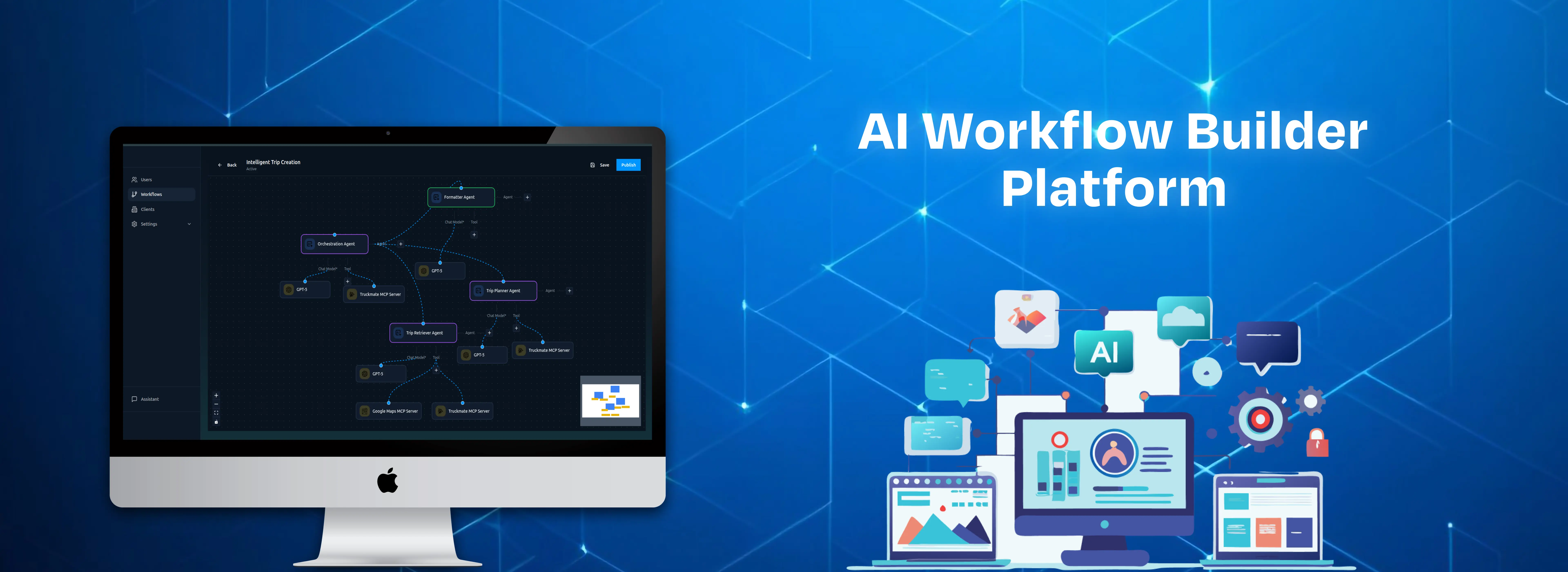
To address these challenges, SculptSoft designed and developed a robust no-code/low-code AI Workflow Builder Platform, a unified visual environment where businesses can design, deploy, and manage intelligent Agentic AI workflows without extensive coding. The platform was engineered to combine enterprise-grade orchestration, autonomous AI Agent collaboration, and MCP-powered interoperability while remaining fully accessible to both technical and non-technical users.
Key elements of our solution included the following:
01
Visual Drag-and-Drop Workflow Builder
A powerful, intuitive interface allowing users to visually create end-to-end AI workflows using reusable components, decision nodes, integration blocks, and autonomous AI Agents without writing complex code.
02
Agentic AI Framework for Autonomous Collaboration
A modular agent architecture enabling specialized AI Agents to independently reason, plan, execute tasks, and collaborate dynamically within workflows based on contextual data, objectives, and real-time execution outcomes.
03
MCP Server Integration and Custom MCP Development
Integration of existing MCP servers alongside custom-built MCP servers tailored to specific enterprise operations, ensuring standardized, secure, and reliable communication between AI Agents and external tools or systems.
04
Seamless API and Enterprise System Orchestration
Built-in orchestration capabilities enabling smooth connectivity with APIs, CRMs, databases, and third-party enterprise systems across multi-step workflows, eliminating manual integration overhead.
05
Multimodal Workflow Input Support
A unified execution framework supporting diverse input types including text, voice, files, structured data, and event-driven triggers, enabling versatile and comprehensive workflow automation across business functions.
06
Configurable Agent Memory and Adaptive Execution Logic
AI Agents equipped with contextual memory and configurable behavioral logic to ensure accurate, adaptive, and consistent decision-making throughout workflow execution even as conditions change dynamically.
07
Real-Time Monitoring, Analytics, and Execution Tracking
Comprehensive dashboards providing real-time visibility into workflow execution, agent activity, performance metrics, and operational analytics without impacting system performance.
08
Enterprise-Grade Security, RBAC, and Audit Logging
Robust role-based access control, audit logging, and compliance-ready architecture ensuring that all workflow operations remain secure, traceable, and fully governable across enterprise environments.
09
LLM-Agnostic and Scalable Deployment Architecture
A flexible, LLM-agnostic ecosystem allowing businesses to integrate and switch between multiple AI models, with scalable deployment options including SaaS, private cloud, and self-hosted infrastructure.
10
Reusable Workflow Templates and Modular Components
Pre-built workflow templates and modular components to accelerate deployment, reduce configuration time, and enable non-technical users to launch intelligent automations quickly.
Through this solution, SculptSoft empowered organizations to replace fragmented, code-heavy automation approaches with a centralized, intelligent, and fully visual AI workflow ecosystem, reducing technical dependency and enabling faster, more agile business operations.
Outcome
The implementation of the AI Workflow Builder Platform delivered significant operational improvements by simplifying AI workflow creation, reducing development dependency, and accelerating enterprise automation initiatives. The platform enabled organizations to rapidly design and deploy autonomous AI workflows while improving scalability, visibility, and execution efficiency across business operations.
Key outcomes achieved through the solution included:
By delivering a centralized Agentic AI workflow ecosystem, the platform helped organizations streamline complex automation processes, reduce operational overhead, and rapidly scale intelligent business operations with greater flexibility and control.
Features
Visual drag-and-drop workflow and AI Agent builder
Autonomous Agentic AI workflow orchestration
Dynamic decision-making and adaptive execution logic
Multimodal input and output support
AI agent memory and contextual awareness
Third-party API and enterprise system integrations
Real-time workflow monitoring and execution tracking
Reusable workflow templates and modular components
Event-driven notification and alert engine
LLM-agnostic architecture with multi-model support
Role-based access control and audit logging
SaaS-based scalable deployment infrastructure
Analytics and workflow performance dashboards
Private cloud and self-hosted deployment support
Secure workflow governance and compliance management
Intelligent task routing and automated process execution
Technologies Used

Frontend
- React.js
- Next.js
- TypeScript
- Tailwind CSS
AI & Automation
- OpenAI Agent SDK
- FastMCP

Cloud & DevOps
- AWS
- CI/CD Pipelines
Database & Storage
- PostgreSQL

Backend
- Python
- FastAPI

Integrations & APIs
- REST APIs
- Third-Party SaaS Integrations

Security & Monitoring
- Role-Based Access Control (RBAC)
- Audit Logging
- Real-Time Monitoring & Analytics
- Encryption & Secure Authentication